How to Build a Hiring Pipeline in 6 Steps
Build a hiring pipeline step by step: five stages plus a closed lane, what to do at each, a weekly rhythm, and how to run it in TalentsGrid.
On this page
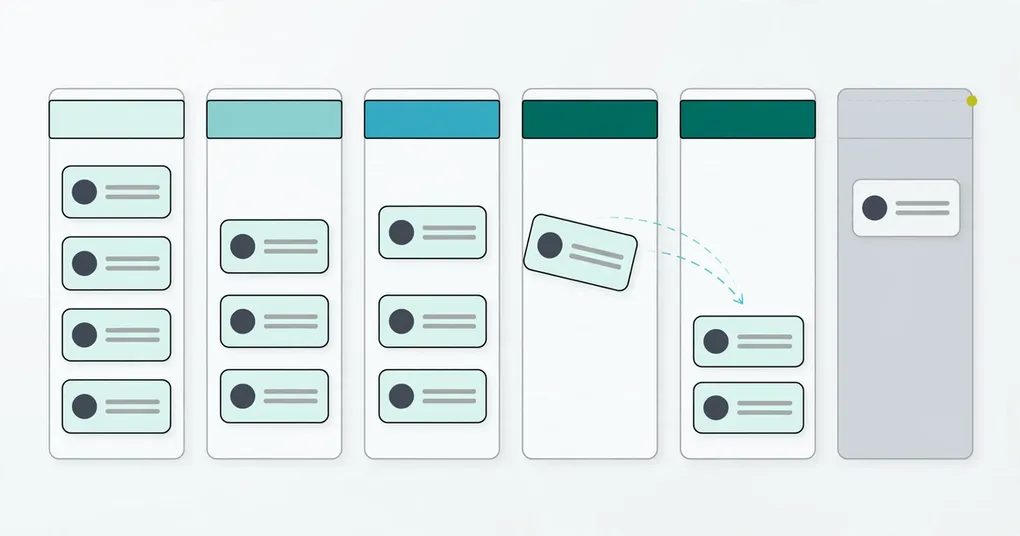
To build a hiring pipeline, list the stages every candidate passes through, decide what you do at each one, and keep every candidate in exactly one stage at a time. Five stages are enough for most small hiring: Applied, Screening, Interviewing, Offer and Hired, plus a place for candidates who leave the process. This guide works for a founder hiring without HR, a freelance recruiter running several roles, and a small team sharing one process.
Key takeaways
- Use five stages and one exit lane: Applied, Screening, Interviewing, Offer, Hired, and Closed.
- Write down what moves a candidate from one stage to the next before you open the role.
- Take notes after every conversation, and give every candidate the same questions.
- Batch the work by stage so candidates do not wait on your calendar.
Why do you need a hiring pipeline, even for one hire?
A pipeline tells you where every candidate stands and why. Without one, you compare candidate #47 to candidate #3 and remember nothing about either. A pipeline also gives each candidate the same process, which is fairer and easier to defend to a hiring manager or a client.
If you recruit for other people, the pipeline is also your proof of work. You can show which candidates you screened, who you interviewed, and why someone dropped out.
How to build a hiring pipeline: 6 steps
1. Define the stages
Start with five stages and one lane for people who leave. The table shows the stage names TalentsGrid uses and what each one means.
| Stage | What it means | Typical action |
|---|---|---|
| Applied | The candidate is in, nobody has judged them yet | Quick review against the must-haves |
| Screening | They passed the first look | Phone screen, short questionnaire or small task |
| Interviewing | They are worth a full evaluation | One or two interviews, scored the same way |
| Offer | You chose them | References, written offer, a reply deadline |
| Hired | They accepted | Close the loop, keep notes on the runners-up |
| Closed | Rejected or withdrawn | Reason noted, one polite message sent |
In TalentsGrid the stages are fixed: the board always shows these columns, and rejected and withdrawn candidates fold into the Closed column. You cannot rename them or add your own. For most small hiring that is a feature. If you feel you need a separate “Phone Screen 2” stage, log it as a second interview round instead.
2. Set the entry rule for each stage
Write one sentence per stage that says what a candidate needs to move forward. For Applied, it could be “has the three must-have skills and can work in our location”. Do this before you read CVs. Otherwise your bar drifts with the pile.
For a client role, share these sentences with the hiring manager so nobody is surprised by the shortlist.
3. Screen Applied candidates quickly
Applied is a filter, so keep it short. Check the must-haves, location and salary range, then move the candidate to Screening or close them.
If you have a lot of CVs, AI can score each one against your job with quotes from the CV as evidence. Scoring one CV takes about 1.5 seconds. The score recommends. You decide who moves on. TalentsGrid never accepts or rejects a candidate on its own. See how AI CV screening works for the method.
4. Run screening and interviews with the same questions
Pick one screening format: a 15 to 20 minute phone call, a short written questionnaire, or a task under two hours. Then run one or two interviews, for example a skills interview and a values interview.
Ask every candidate the same core questions so you can compare them fairly. TalentsGrid can turn gaps in a CV into interview questions, with weak, fair and strong answer guides. Details are on the interview kits page. Record each round with its type, date, interviewers, a 1 to 5 rating and feedback. For note-taking habits that hold up, read how to structure interview notes.
5. Make the offer and close the loop
Check references, send a written offer and set a reply deadline. Seven days is common. Good candidates have other options, so do not let this step sit.
When someone accepts, move them to Hired. Then message the other finalists. A short, honest note protects your reputation, and it keeps the door open for the runner-up. When you reject in TalentsGrid, you add a reason, and it is saved to the application notes.
6. Review the pipeline every week
Look at three things once a week: how long candidates sit in each stage, where most of them drop out, and how many applications it took to reach a hire. These tell you whether the job post, the screen or the offer needs work. The dashboard shows candidate counts per stage. Time to hire and offer acceptance you can track in a sheet.
Set up your pipeline in TalentsGrid
TalentsGrid is an AI hiring copilot for freelance recruiters and small teams: it scores each CV against your job with quotes as evidence, turns gaps into interview questions, and keeps your candidate data yours. Here is the setup:
- Create a job. You can paste a job description into the chat and approve the preview.
- Add candidates by dropping CVs into the chat or importing a CSV. Every create or update waits for your approval.
- Open the Pipeline page. You will see one column per stage. Drag a card to move it on desktop, or change the stage in the candidate drawer.
- Use the drawer tabs for Interviews, Notes and Expectation (salary, notice period and similar).
- Closing a candidate asks for a reason, so nobody is rejected silently.
Freelancers can keep one workspace per client so pipelines never mix. The Free plan covers up to 500 candidates. See pricing for the other plans.
What are the most common pipeline mistakes?
- Too many stages. Each stage adds friction. Five plus Closed is plenty.
- Silence after a rejection. Send a short message. You write it yourself or draft it in the chat and review it before it goes out.
- Moving too slowly. Strong candidates talk to several employers. Aim to go from first contact to offer in about two weeks where the role allows it.
- No notes. You will not remember why you liked someone. Write it down the same day.
- No shared bar. Without written criteria you compare gut feelings.
A weekly rhythm for one-person hiring
Batching keeps candidates moving without constant context switching:
- Monday: review new applications and move them on or close them.
- Tuesday and Wednesday: screening calls.
- Thursday and Friday: interviews.
- Next Monday: decide, make offers, send replies.
FAQ
How many stages should a hiring pipeline have?
Five stages cover most small hiring: Applied, Screening, Interviewing, Offer and Hired, plus a lane for candidates who leave. More stages add admin work without better decisions. If you need extra rounds, track them inside the Interviewing stage as separate interview rounds.
Can I customize pipeline stages in TalentsGrid?
No. The stages are fixed: Applied, Screening, Interviewing, Offer, Hired and Closed (rejected and withdrawn candidates). Within Interviewing you can log several rounds, each with a type such as technical, HR, behavioral or final, a date, a rating and feedback.
How long should a hiring process take?
Plan on about two weeks from first contact to offer for most small-company roles. Senior or niche roles take longer. The point is to keep the gap between steps short, because strong candidates often have other processes running.
Does AI decide who moves through the pipeline?
No. AI scores CVs and suggests interview questions, and you move candidates between stages. TalentsGrid never accepts or rejects a candidate by itself, and chat actions that write data wait for your approval first.
Start with one role
Pick one open role, write your entry rules, and run it through the five stages. Create a free TalentsGrid workspace and add your first candidates.